# 🎮 PanelSIX




## 🚀 Modular Counter-Strike 1.6 Server Management Platform
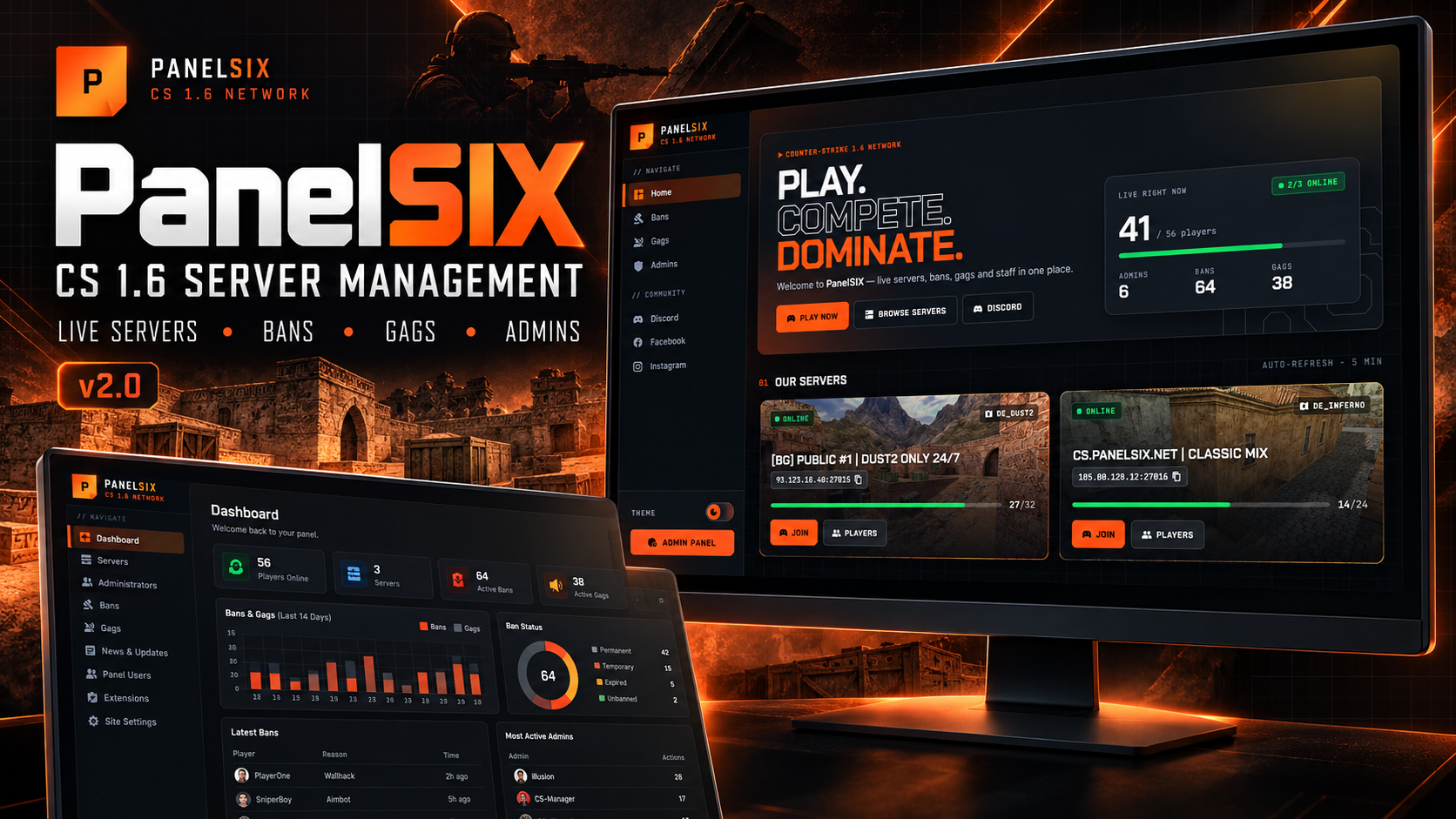
**PanelSIX** is a modern web platform for Counter-Strike 1.6 server owners and gaming networks.
It combines a public gaming website with a powerful admin panel, so you manage everything from one place.
Developed by **illusion** @ https://codestrike.store
---
## ⭐ Why PanelSIX?
PanelSIX is built for real communities — not just a script, but a platform that grows with you.
- 🎮 Built specifically for CS 1.6 server ecosystems
- 🌗 Dark by default, light theme with one click
- 📊 Live statistics and charts on the dashboard and the homepage
- 📱 Fully responsive — desktop, tablet and phone
- ⚡ Fast and lightweight, no build step
- 🔌 Extension-ready architecture
- 🔒 Secure by default
Whether you run one server or a whole network, PanelSIX adapts to your workflow.
---
## 📖 Overview
PanelSIX provides:
- A **public gaming website** where players see live servers, join via Steam, check the player list, bans, gags, admins, news and updates.
- A **secure admin panel** where owners manage servers, admins, bans, gags, access levels, content, panel users and extensions.
Everything is unified in one platform with one design and one theme.
---
## ✨ Features
### 🎨 Design
| Feature | Description |
|---|---|
| Dark / Light theme | Dark by default. The switch is in the sidebar, the top bar, the login page and the installer, and it is remembered per browser |
| Modern gaming UI | Bold display type, HUD-style cards, map backgrounds on server cards |
| Responsive | Mobile top bar with a slide-in menu, tables scroll horizontally on small screens |
| Two layouts | Sidebar (default) or top navigation, selectable in Site Settings |
### 🌐 Public Website
| Feature | Description |
|---|---|
| Homepage | Hero with live player count, "Play now" button and platform statistics |
| Servers | Live server cards with map background, player bar, copy IP and Join via Steam |
| Server Details | Live player list with frags, play time, bot and server message labels |
| Statistics | Servers, players, admins, bans, gags, posts and a 14-day moderation chart |
| Ban List | Search, status badges (active, permanent, expired, unbanned) and time left |
| Gag List | Search, gag type (chat / voice / both) and time left |
| Admin List | Staff cards with role and expiry date |
| News & Updates | Cards with images, detail pages with reading time and related posts |
### 🔧 Admin Panel
| Module | Functions |
|---|---|
| Dashboard | KPIs (players, servers, active bans and gags, admins, content), 14-day bans/gags chart, ban status breakdown, latest bans and gags, top ban reasons, most active admins, servers table, quick access |
| Servers | Add, edit and manage servers |
| Administrators | SteamID / IP / Nickname admins with expiry dates |
| Access Levels | Permission presets |
| Bans | View, edit, unban and delete bans |
| Gags | Manage chat and voice restrictions |
| News Editor | Rich text editor |
| Updates Editor | Publish server changes |
| Panel Users | Manage who can log in to the panel |
| Extensions | Install and manage official extensions |
| Site Settings | Name, URL, social links, layout and ban system |
---
## 🔌 Extension System
PanelSIX is built around a modular ecosystem. Extensions add features without modifying the core panel and follow the panel theme automatically.
Extensions are installed from the official CodeStrike store. Uninstalling an extension deletes its database tables — disable it if you only want to turn it off.
---
## 💻 Requirements
### Minimum
- PHP 7.0+ (works on PHP 7.x and 8.x)
- MySQL 5.7+ or MariaDB 10.2+
- Apache or Nginx
- PDO, cURL and JSON extensions
### Recommended
- PHP 8.1+
- MySQL 8+
- HTTPS enabled
- mod_rewrite
- DOM extension (best sanitizing of news and update content)
---
## 🚀 Installation
### Step 1 — Upload Files
Upload PanelSIX to your hosting directory:
```
/var/www/html/panelsix/
```
---
### Step 2 — Run Installer
Open in browser:
```
http://your-domain.com/install.php
```
Follow the setup wizard:
1. Welcome
2. Database setup
3. Create admin account
4. Finish installation
After installation you are logged in automatically.
In step 2 you choose the installation mode:
- **Fresh Install** deletes the PanelSIX tables and creates them again with default data. Other tables in the same database, for example tables from game server plugins, are not touched.
- **Migration / Update** is for upgrading an older PanelSIX. All tables and data are kept. The installer compares the database with `SQL/PanelSIX.sql` and only adds the missing tables, columns, primary keys and AUTO_INCREMENT. Existing panel users and settings are kept, and step 3 shows a report of every change. It is safe to run more than once.
In both modes a full backup is saved to `backups/` first. If the backup fails, nothing is changed.
---
### Step 3 — Security
Delete the installer:
```
rm install.php
```
---
### Step 4 — Access Admin Panel
```
http://your-domain.com/admin/
```
---
## ⬆️ Upgrading from v1
1. Back up your files and database.
2. Upload the new files over the old ones.
3. Delete `install.lock`, open `install.php`, enter your database details again in step 2 and choose **Migration / Update**.
4. Clear your browser cache once so the new design loads.
No database changes are needed for the v2 design — your data stays as it is.
---
## 🎮 Game Server Integration
PanelSIX manages your server administrators through a database connection, using the **official AMX Mod X plugins** that come with every server.
### How to load admins from the database
1. **Enable the SQL admin plugin:**
- Open `cstrike/addons/amxmodx/configs/plugins.ini`.
- Disable the default admin plugin: `;admin.amxx` (add a semicolon).
- Enable the SQL admin plugin: `admin_sql.amxx` (remove any semicolon).
2. **Configure the database connection:**
- Open `cstrike/addons/amxmodx/configs/sql.cfg`.
- Fill in the database details (Host, User, Password, Database) you used during installation.
3. **Reload the server:**
- Restart the server or type `amx_reloadadmins` in the console.
PanelSIX uses the standard `diveban_admins` table name for full compatibility.
### Ban system
PanelSIX supports two ban plugins. The installer asks which one to use, and it can be changed later in **Admin Panel → Dashboard → Site Settings → Ban System**.
| Ban system | Table | Notes |
|---|---|---|
| **Diveban X** (default) | `divebanx` | Included in `plugins/`. |
| **CodeStrike Ban System** | `codestrike_bans` | Sold separately. In `addons/amxmodx/configs/CodeStrikePlugins/codestrike_bans.ini` set `Type = mysql`, `Table = codestrike_bans` and the same database details as PanelSIX. Unbanning from the panel keeps the record as history, the same way `amx_unban` does. |
### Gag system
Gags are read from the `gag_system` table of the ILLUSION GAG System plugin (included in `plugins/`). `gag_time` is the length in minutes and `expire_time` is the end time; `-1` means a permanent gag.
---
## 🆕 What's New in v2.0
### Design
- **Full redesign** of the public site, the admin panel and the installer with one shared design.
- **Dark theme by default** and a **light theme** switch, remembered per browser.
- **Fully responsive** layout with a mobile top bar and slide-in menu.
- Admin sidebar grouped into sections: Overview, Game Servers, Moderation, Content, System.
### Statistics
- **Admin dashboard:** players online and slot usage, servers online, active bans and gags with trend charts, game admins, content, a 14-day bans/gags chart, ban status breakdown, latest bans and gags, top ban reasons, most active admins and a servers table.
- **Warning** when game admins expire within 7 days or have already expired.
- **Homepage:** live player count, platform statistics and a moderation activity chart.
### Pages
- New homepage, server details, ban list, gag list, admin list, news and update pages.
- New login page and extensions page.
- Ban and gag lists keep the search text, show status badges and time left, and use compact pagination.
### Security & Fixes
- News and update content is sanitized — scripts and event attributes are removed.
- CSRF protection on site settings and on extension install / enable / disable / uninstall.
- The session ID is regenerated on login.
- Permanent gags were shown as "Ungagged" on the public gag list.
- Menu highlighting on add / edit pages and extension menu links from extension pages.
---
## 📁 Project Structure
```
panelsix/
├── admin/ Admin panel pages
│ └── includes/ Admin navigation
├── assets/
│ ├── css/ panelsix.css — design system and themes
│ ├── js/ panelsix.js — theme switch, menus, charts
│ └── images/ Logos, map backgrounds, post images
├── backups/ Installer backups
├── cache/ Server status cache (5 minutes)
├── cron/ Scheduled cleanup scripts
├── extensions/ Installed extensions
├── includes/ Shared header, navigation, footer, statistics, content sanitizer
├── plugins/ AMX Mod X plugins (Diveban X, GAG System)
├── protected/ Database connection, settings, ban system
├── SQL/ Database schema
├── index.php
├── install.php
└── README.md
```
---
## 🔒 Security
PanelSIX includes built-in protections:
- CSRF tokens
- Prepared statements
- XSS filtering and rich text sanitizing
- Secure password hashing (BCRYPT)
- Session security (ID regenerated on login)
- Input validation
### Recommendations
- Delete `install.php`
- Use HTTPS
- Keep database credentials private
- Back up regularly
- Protect the `/protected` directory
---
## 🎨 Technologies
- PHP 7.0+ / 8.x
- MySQL / MariaDB
- Tailwind CSS
- Chart.js
- CKEditor 5
- SweetAlert2
- Google Fonts (Chakra Petch, Inter, JetBrains Mono) and Material Icons
---
## 📞 Support
Website: https://codestrike.store
Discord: Official community server
Contact: Website contact form
---
## 📄 License
© PanelSIX — All rights reserved.
This software is proprietary. Unauthorized redistribution is prohibited.
---
**Made with ❤️ and ☕ by illusion @ codestrike.store**