1 / 2
# CS SetCharName
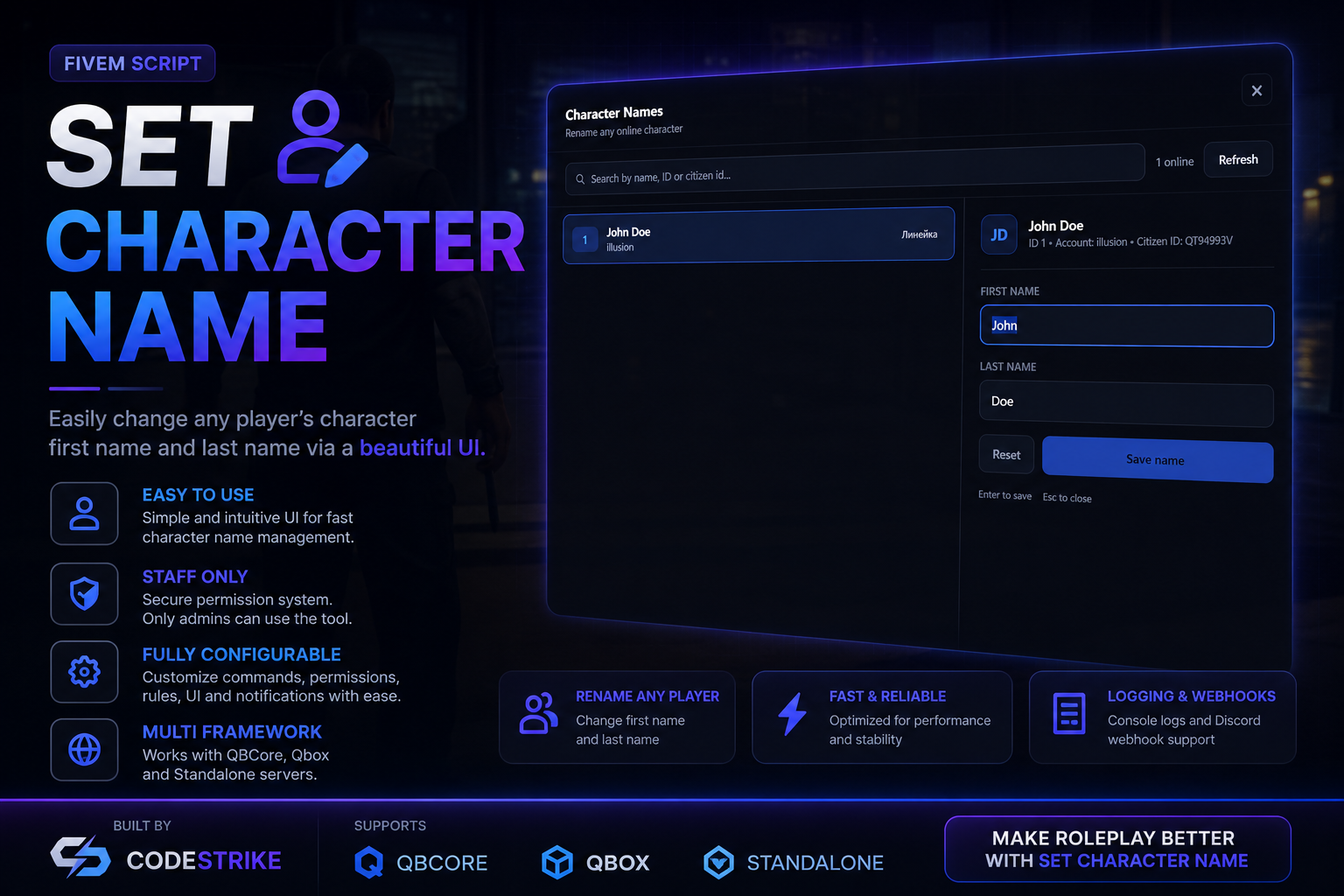
**Rename any online character from a clean admin panel — applied instantly, saved permanently.**
Created by **illusion @ CodeStrike**
---
## Why this one
Renaming a character sounds like a three-line script, and that is exactly why
most of them are broken. `SetCharInfo` updates the player's live data and
pushes it to their client, so the new name shows up immediately and everything
looks correct — but it never touches the database. The old name comes straight
back the next time that player connects.
CS SetCharName does the full job: live update **and** a verified write to the
`players` table, with the failure reported to you instead of swallowed.
| | |
|---|---|
| **Instant** | The new name is live for every resource the moment you hit save. No relog, no reconnect. |
| **Actually saved** | An explicit database write, and a distinct message if that write fails. |
| **Zero dependencies** | No ox_lib, no CDN, no SQL file. Just Qbox. |
| **Permission-gated properly** | Every network call re-checks ACE. Opening the panel proves nothing. |
| **XSS-hardened** | A crafted Steam name cannot run code in your admins' game. |
| **UTF-8 aware** | Cyrillic, Greek, accented Latin — all handled, with a strict-Latin mode if you want it. |
| **Searchable list** | Filter by server ID, account name, character name and citizen id at once. |
| **Logged** | Console and Discord webhook, with staff, target, both names and the license. |
| **Localised** | English and Bulgarian included, one file per language. |
---
## Preview
<!--
Drop your screenshots next to this file and reference them here, e.g.

-->
---
## Requirements
- **Qbox** (`qbx_core`) — this resource reads and writes `PlayerData.charinfo`
through the official qbx_core exports.
- FiveM server build **6683** or newer.
> QBCore (`qb-core`) is **not** supported out of the box. The two frameworks
> store `charinfo` the same way, but the save path differs — see
> [Adapting to another framework](#adapting-to-another-framework).
---
## Installation
1. Copy the `cs_setcharname` folder into your `resources` directory.
2. Start it:
```cfg
# server.cfg
ensure cs_setcharname
```
If you drop it into a bracketed category you already start — `[staff-tools]`,
`[admin]`, whatever you use — it starts automatically and you do not need a
second `ensure` line.
3. Grant the permission (next section).
4. Restart the server.
You should see this in the console:
```
[cs_setcharname] v1.0.0 loaded - /setcharname (illusion @ CodeStrike)
```
There is no SQL file to import. The resource writes to the `players` table that
Qbox already created.
---
## Permissions
A player may use the tool if they pass **any** ACE check in `Config.AllowedAces`.
The shipped default is:
```lua
Config.AllowedAces = {
'command.setcharname',
'admin',
'owner',
}
```
Pick whichever fits your setup and add it to `permissions.cfg`:
```cfg
# Dedicated permission — recommended, keeps this tool independent
add_ace group.admin command.setcharname allow
# Or reuse an existing staff permission you already grant
add_ace group.admin admin allow
```
If your groups inherit from each other, the permission follows the chain:
```cfg
add_principal group.owner group.admin # owners now have it too
```
To hand it to a lower rank as well:
```cfg
add_ace group.mod command.setcharname allow
```
Want it locked down to a single node? Trim `Config.AllowedAces` to just
`{ 'command.setcharname' }` and nothing else will open the panel.
> ACE changes are read at startup. After editing `permissions.cfg`, restart the
> server — a resource `restart` alone is not enough.
---
## Commands
| Command | Result |
|---|---|
| `/setcharname` | Opens the panel |
| `/setcharname <id> <firstname> <lastname>` | Renames directly, no UI |
The direct form accepts multi-word surnames: `/setcharname 12 John Van Der Berg`
sets the last name to `Van Der Berg`.
Both forms also work from the server console, where the permission check is
skipped.
---
## Configuration
Everything lives in `config.lua`.
### General
```lua
Config.Locale = 'en' -- 'en' or 'bg'
Config.Command = 'setcharname' -- rename the command if you like
```
### Name rules
```lua
Config.Name = {
minLength = 2,
maxLength = 24,
strictLatin = false, -- true = ASCII letters only
allowDigits = false,
autoCapitalize = true, -- "john doe" -> "John Doe"
}
```
Allowed characters are letters, spaces, hyphens and apostrophes, so `O'Brien`
and `Anne-Marie` pass. Everything else is rejected.
**On `autoCapitalize`:** capitalisation is applied to plain ASCII names only.
Lua's `string.upper` works on raw bytes and would corrupt a multi-byte UTF-8
sequence, so names containing non-ASCII characters are stored exactly as typed.
This is deliberate, not a limitation to work around.
**On `strictLatin`:** leave it `false` to allow any script. Set it `true` if your
server requires Latin-only character names.
### Behaviour
```lua
Config.NotifyTarget = true -- tell the renamed player what happened
Config.ShowCitizenId = true -- set false to keep it off screen while streaming
Config.Cooldown = 2 -- seconds between renames, per staff member
```
### Logging
```lua
Config.Logs = {
console = true,
webhook = '', -- Discord webhook URL, empty to disable
botName = 'SetCharName',
}
```
Each entry records the staff member, the target, the old name, the new name and
the target's license.
### Appearance
```lua
Config.UI = {
accent = '#5b8cff',
opacity = 0.97, -- panel background opacity, 0.0 - 1.0
}
```
> **Do not add `backdrop-filter` to `web/style.css`.** FiveM renders the NUI into
> its own texture and alpha-blends it over the game, so a `backdrop-filter` has
> no real backdrop to sample. Chromium falls back to the opaque black root layer
> and paints the whole composited layer — expanded by the blur radius, so larger
> than the element itself — solid black. It looks perfect in a browser and shows
> a black rectangle in game. Use `Config.UI.opacity` instead.
---
## Panel controls
| Input | Action |
|---|---|
| Click a row | Select that player |
| Type in the search box | Filter by ID, account, character name or citizen id |
| `Enter` | Save |
| `Esc` | Close |
| Click outside the panel | Close |
The save button stays disabled until both fields are valid **and** something has
actually changed, so you cannot burn a cooldown on a no-op.
---
## How the rename applies
Worth stating plainly, because it is the part that separates a working tool from
one that only appears to work:
```lua
exports.qbx_core:SetCharInfo(id, 'firstname', firstname)
exports.qbx_core:SetCharInfo(id, 'lastname', lastname)
exports.qbx_core:Save(id)
```
`SetCharInfo` updates `PlayerData` and pushes it to the client through
`QBCore:Player:SetPlayerData`. That is what makes the new name visible
immediately, everywhere, without a relog.
It does **not** write to the database. `charinfo` only reaches the `players`
table through a save, so the explicit `Save` is what makes the change permanent.
If it fails, you get a specific message saying the name was applied but not
saved — rather than a success toast hiding a rename that will evaporate.
---
## Integration
Most resources need nothing. They read `PlayerData.charinfo`, which qbx_core has
already refreshed before these events fire.
If something in your server caches the character name at spawn — overhead
nameplates, an ID card, a phone contact list — hook one of these:
```lua
-- Server: fires for every rename
AddEventHandler('cs_setcharname:server:nameChanged', function(source, oldName, newName)
print(('%s is now %s'):format(oldName, newName))
end)
```
```lua
-- Client: fires on the renamed player only
AddEventHandler('cs_setcharname:nameChanged', function(oldName, newName)
-- refresh whatever holds a copy of the name
end)
```
### Exports
```lua
-- Server. Runs with console authority, so it bypasses the ACE check.
-- Use it from your own admin menu, a Discord bot bridge, an application system.
local ok, message = exports.cs_setcharname:SetName(targetId, 'John', 'Doe')
-- Server. Ask whether a player is allowed to use the tool.
exports.cs_setcharname:CanUse(source) --> boolean
-- Client.
exports.cs_setcharname:IsOpen() --> boolean
```
---
## Localisation
Copy `locales/en.lua`, rename the file and the table key, translate the values,
then point `Config.Locale` at it:
```lua
-- locales/de.lua
Locales = Locales or {}
Locales['de'] = {
['title'] = 'Charakternamen',
-- ...
}
```
A missing key falls back to English rather than breaking the panel, so a partial
translation is safe to ship.
---
## Security
This is an admin tool, so the boundaries are worth spelling out.
- **Every net event re-checks the ACE permission.** Having the panel open proves
nothing — any client can trigger a registered net event directly. The gate is
in `cs_setcharname:server:setName`, not in the UI.
- **All validation runs again on the server.** The identical check in the panel
exists purely for instant feedback and is treated as advisory.
- **Malformed UTF-8 is rejected.** This also blocks the byte sequences used to
smuggle control characters past a naive length check.
- **The panel never uses `innerHTML` for player data.** Account names, character
names and job labels are written with `textContent`, so a crafted Steam name
cannot execute code in an admin's game.
- **Rate limited** per staff member via `Config.Cooldown`.
- **Fully logged**, including the target's license.
---
## Adapting to another framework
The framework-specific calls are confined to `server/main.lua` and there are
only four of them: `GetPlayer`, `SetCharInfo`, `Save` and `Notify`. For QBCore
the equivalents are `QBCore.Functions.GetPlayer`,
`Player.Functions.SetPlayerData('charinfo', charinfo)`, `Player.Functions.Save()`
and the `QBCore:Notify` client event.
---
## Troubleshooting
**"You do not have permission to use this command."**
The ACE is missing. Add one of the lines from [Permissions](#permissions) and
restart the **server** — ACE changes are not picked up by a resource restart.
**The name reverts after a relog.**
The database write failed. The panel reports this specifically instead of
showing success; check the console for a MySQL error and confirm `oxmysql` is
connected.
**"That player has not finished loading their character yet."**
They are connected but still on the character selection screen, so there is no
`PlayerData` to modify. Wait until they spawn.
**Some UI still shows the old name.**
That resource cached the name at spawn. Hook `cs_setcharname:nameChanged` in it,
or change it to read `PlayerData.charinfo` on demand.
**A black box appears behind the panel.**
Something in `web/style.css` is using `backdrop-filter`. Remove it — see the
note under [Appearance](#appearance).
**The panel does not open and nothing is printed.**
Check that `qbx_core` is started. The resource prints a red warning on boot if
it is not.
---
## File layout
```
cs_setcharname/
├── fxmanifest.lua
├── config.lua all settings
├── shared/main.lua locale helper + name validation
├── locales/
│ ├── en.lua
│ └── bg.lua
├── client/main.lua NUI bridge, focus handling
├── server/main.lua permissions, validation, rename, logging
└── web/
├── index.html
├── style.css
└── script.js
```
Validation lives in `shared/` on purpose: the panel and the server enforce
byte-for-byte identical rules, so the UI can never accept something the server
would reject.
---
## Changelog
### 1.0.0
- Initial release
---
© CodeStrike — illusion. Redistribution or resale of the source is not permitted
**Rename any online character from a clean admin panel — applied instantly, saved permanently.**
Created by **illusion @ CodeStrike**
---
## Why this one
Renaming a character sounds like a three-line script, and that is exactly why
most of them are broken. `SetCharInfo` updates the player's live data and
pushes it to their client, so the new name shows up immediately and everything
looks correct — but it never touches the database. The old name comes straight
back the next time that player connects.
CS SetCharName does the full job: live update **and** a verified write to the
`players` table, with the failure reported to you instead of swallowed.
| | |
|---|---|
| **Instant** | The new name is live for every resource the moment you hit save. No relog, no reconnect. |
| **Actually saved** | An explicit database write, and a distinct message if that write fails. |
| **Zero dependencies** | No ox_lib, no CDN, no SQL file. Just Qbox. |
| **Permission-gated properly** | Every network call re-checks ACE. Opening the panel proves nothing. |
| **XSS-hardened** | A crafted Steam name cannot run code in your admins' game. |
| **UTF-8 aware** | Cyrillic, Greek, accented Latin — all handled, with a strict-Latin mode if you want it. |
| **Searchable list** | Filter by server ID, account name, character name and citizen id at once. |
| **Logged** | Console and Discord webhook, with staff, target, both names and the license. |
| **Localised** | English and Bulgarian included, one file per language. |
---
## Preview
<!--
Drop your screenshots next to this file and reference them here, e.g.

-->
---
## Requirements
- **Qbox** (`qbx_core`) — this resource reads and writes `PlayerData.charinfo`
through the official qbx_core exports.
- FiveM server build **6683** or newer.
> QBCore (`qb-core`) is **not** supported out of the box. The two frameworks
> store `charinfo` the same way, but the save path differs — see
> [Adapting to another framework](#adapting-to-another-framework).
---
## Installation
1. Copy the `cs_setcharname` folder into your `resources` directory.
2. Start it:
```cfg
# server.cfg
ensure cs_setcharname
```
If you drop it into a bracketed category you already start — `[staff-tools]`,
`[admin]`, whatever you use — it starts automatically and you do not need a
second `ensure` line.
3. Grant the permission (next section).
4. Restart the server.
You should see this in the console:
```
[cs_setcharname] v1.0.0 loaded - /setcharname (illusion @ CodeStrike)
```
There is no SQL file to import. The resource writes to the `players` table that
Qbox already created.
---
## Permissions
A player may use the tool if they pass **any** ACE check in `Config.AllowedAces`.
The shipped default is:
```lua
Config.AllowedAces = {
'command.setcharname',
'admin',
'owner',
}
```
Pick whichever fits your setup and add it to `permissions.cfg`:
```cfg
# Dedicated permission — recommended, keeps this tool independent
add_ace group.admin command.setcharname allow
# Or reuse an existing staff permission you already grant
add_ace group.admin admin allow
```
If your groups inherit from each other, the permission follows the chain:
```cfg
add_principal group.owner group.admin # owners now have it too
```
To hand it to a lower rank as well:
```cfg
add_ace group.mod command.setcharname allow
```
Want it locked down to a single node? Trim `Config.AllowedAces` to just
`{ 'command.setcharname' }` and nothing else will open the panel.
> ACE changes are read at startup. After editing `permissions.cfg`, restart the
> server — a resource `restart` alone is not enough.
---
## Commands
| Command | Result |
|---|---|
| `/setcharname` | Opens the panel |
| `/setcharname <id> <firstname> <lastname>` | Renames directly, no UI |
The direct form accepts multi-word surnames: `/setcharname 12 John Van Der Berg`
sets the last name to `Van Der Berg`.
Both forms also work from the server console, where the permission check is
skipped.
---
## Configuration
Everything lives in `config.lua`.
### General
```lua
Config.Locale = 'en' -- 'en' or 'bg'
Config.Command = 'setcharname' -- rename the command if you like
```
### Name rules
```lua
Config.Name = {
minLength = 2,
maxLength = 24,
strictLatin = false, -- true = ASCII letters only
allowDigits = false,
autoCapitalize = true, -- "john doe" -> "John Doe"
}
```
Allowed characters are letters, spaces, hyphens and apostrophes, so `O'Brien`
and `Anne-Marie` pass. Everything else is rejected.
**On `autoCapitalize`:** capitalisation is applied to plain ASCII names only.
Lua's `string.upper` works on raw bytes and would corrupt a multi-byte UTF-8
sequence, so names containing non-ASCII characters are stored exactly as typed.
This is deliberate, not a limitation to work around.
**On `strictLatin`:** leave it `false` to allow any script. Set it `true` if your
server requires Latin-only character names.
### Behaviour
```lua
Config.NotifyTarget = true -- tell the renamed player what happened
Config.ShowCitizenId = true -- set false to keep it off screen while streaming
Config.Cooldown = 2 -- seconds between renames, per staff member
```
### Logging
```lua
Config.Logs = {
console = true,
webhook = '', -- Discord webhook URL, empty to disable
botName = 'SetCharName',
}
```
Each entry records the staff member, the target, the old name, the new name and
the target's license.
### Appearance
```lua
Config.UI = {
accent = '#5b8cff',
opacity = 0.97, -- panel background opacity, 0.0 - 1.0
}
```
> **Do not add `backdrop-filter` to `web/style.css`.** FiveM renders the NUI into
> its own texture and alpha-blends it over the game, so a `backdrop-filter` has
> no real backdrop to sample. Chromium falls back to the opaque black root layer
> and paints the whole composited layer — expanded by the blur radius, so larger
> than the element itself — solid black. It looks perfect in a browser and shows
> a black rectangle in game. Use `Config.UI.opacity` instead.
---
## Panel controls
| Input | Action |
|---|---|
| Click a row | Select that player |
| Type in the search box | Filter by ID, account, character name or citizen id |
| `Enter` | Save |
| `Esc` | Close |
| Click outside the panel | Close |
The save button stays disabled until both fields are valid **and** something has
actually changed, so you cannot burn a cooldown on a no-op.
---
## How the rename applies
Worth stating plainly, because it is the part that separates a working tool from
one that only appears to work:
```lua
exports.qbx_core:SetCharInfo(id, 'firstname', firstname)
exports.qbx_core:SetCharInfo(id, 'lastname', lastname)
exports.qbx_core:Save(id)
```
`SetCharInfo` updates `PlayerData` and pushes it to the client through
`QBCore:Player:SetPlayerData`. That is what makes the new name visible
immediately, everywhere, without a relog.
It does **not** write to the database. `charinfo` only reaches the `players`
table through a save, so the explicit `Save` is what makes the change permanent.
If it fails, you get a specific message saying the name was applied but not
saved — rather than a success toast hiding a rename that will evaporate.
---
## Integration
Most resources need nothing. They read `PlayerData.charinfo`, which qbx_core has
already refreshed before these events fire.
If something in your server caches the character name at spawn — overhead
nameplates, an ID card, a phone contact list — hook one of these:
```lua
-- Server: fires for every rename
AddEventHandler('cs_setcharname:server:nameChanged', function(source, oldName, newName)
print(('%s is now %s'):format(oldName, newName))
end)
```
```lua
-- Client: fires on the renamed player only
AddEventHandler('cs_setcharname:nameChanged', function(oldName, newName)
-- refresh whatever holds a copy of the name
end)
```
### Exports
```lua
-- Server. Runs with console authority, so it bypasses the ACE check.
-- Use it from your own admin menu, a Discord bot bridge, an application system.
local ok, message = exports.cs_setcharname:SetName(targetId, 'John', 'Doe')
-- Server. Ask whether a player is allowed to use the tool.
exports.cs_setcharname:CanUse(source) --> boolean
-- Client.
exports.cs_setcharname:IsOpen() --> boolean
```
---
## Localisation
Copy `locales/en.lua`, rename the file and the table key, translate the values,
then point `Config.Locale` at it:
```lua
-- locales/de.lua
Locales = Locales or {}
Locales['de'] = {
['title'] = 'Charakternamen',
-- ...
}
```
A missing key falls back to English rather than breaking the panel, so a partial
translation is safe to ship.
---
## Security
This is an admin tool, so the boundaries are worth spelling out.
- **Every net event re-checks the ACE permission.** Having the panel open proves
nothing — any client can trigger a registered net event directly. The gate is
in `cs_setcharname:server:setName`, not in the UI.
- **All validation runs again on the server.** The identical check in the panel
exists purely for instant feedback and is treated as advisory.
- **Malformed UTF-8 is rejected.** This also blocks the byte sequences used to
smuggle control characters past a naive length check.
- **The panel never uses `innerHTML` for player data.** Account names, character
names and job labels are written with `textContent`, so a crafted Steam name
cannot execute code in an admin's game.
- **Rate limited** per staff member via `Config.Cooldown`.
- **Fully logged**, including the target's license.
---
## Adapting to another framework
The framework-specific calls are confined to `server/main.lua` and there are
only four of them: `GetPlayer`, `SetCharInfo`, `Save` and `Notify`. For QBCore
the equivalents are `QBCore.Functions.GetPlayer`,
`Player.Functions.SetPlayerData('charinfo', charinfo)`, `Player.Functions.Save()`
and the `QBCore:Notify` client event.
---
## Troubleshooting
**"You do not have permission to use this command."**
The ACE is missing. Add one of the lines from [Permissions](#permissions) and
restart the **server** — ACE changes are not picked up by a resource restart.
**The name reverts after a relog.**
The database write failed. The panel reports this specifically instead of
showing success; check the console for a MySQL error and confirm `oxmysql` is
connected.
**"That player has not finished loading their character yet."**
They are connected but still on the character selection screen, so there is no
`PlayerData` to modify. Wait until they spawn.
**Some UI still shows the old name.**
That resource cached the name at spawn. Hook `cs_setcharname:nameChanged` in it,
or change it to read `PlayerData.charinfo` on demand.
**A black box appears behind the panel.**
Something in `web/style.css` is using `backdrop-filter`. Remove it — see the
note under [Appearance](#appearance).
**The panel does not open and nothing is printed.**
Check that `qbx_core` is started. The resource prints a red warning on boot if
it is not.
---
## File layout
```
cs_setcharname/
├── fxmanifest.lua
├── config.lua all settings
├── shared/main.lua locale helper + name validation
├── locales/
│ ├── en.lua
│ └── bg.lua
├── client/main.lua NUI bridge, focus handling
├── server/main.lua permissions, validation, rename, logging
└── web/
├── index.html
├── style.css
└── script.js
```
Validation lives in `shared/` on purpose: the panel and the server enforce
byte-for-byte identical rules, so the UI can never accept something the server
would reject.
---
## Changelog
### 1.0.0
- Initial release
---
© CodeStrike — illusion. Redistribution or resale of the source is not permitted
Often bought together−10% when bought together
Total for selected:
Need help with this product?
Join our Discord server and open a ticket — we usually reply within 30 minutes.
Reviews
—
0 review(s)
Login to write a review Login