1 / 9
# 🌐 PanelSIX Network



**Official Extension for PanelSIX**
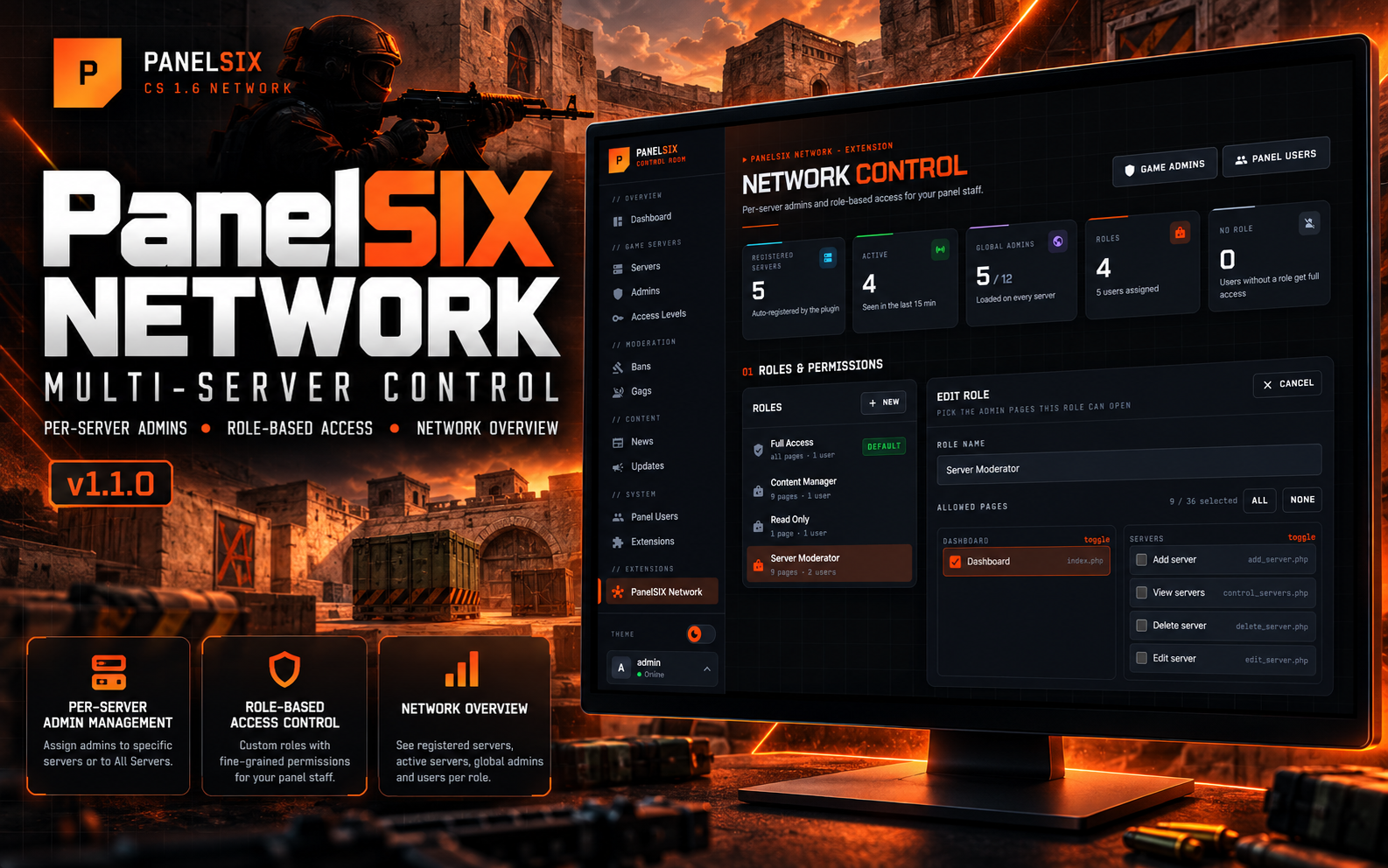
**PanelSIX Network** turns a standard PanelSIX installation into a network management platform. It adds two core systems: **Per-Server Admin Management** and **Role-Based Access Control (RBAC)** for your panel staff.
---
## ✨ Key Features
### 1. Per-Server Admin Management
Run many game servers from one database and decide which admins load on which server.
- **Auto-registration:** each server registers itself in the panel the moment it starts. No manual setup.
- **Persistent server tokens:** every server creates a permanent ID file (`configs/psn_server.id`). If the hostname or IP changes, the panel still recognizes the server and keeps all assignments — no duplicates.
- **All Servers or specific servers:** give an admin access everywhere, or only on the servers you pick.
- **All Servers really means all** — those admins also load on servers that register later.
- **Smart AMXX plugin:** the included `admin.sma` reads its token and loads only the admins assigned to that server plus the "All Servers" admins.
- **Admin list integration:** server badges in the admins table (green = All Servers, violet = specific servers) and a server filter.
### 2. Role-Based Access Control (RBAC)
Delegate panel work safely.
- **Custom roles:** choose exactly which admin pages a role can open, grouped by area (Bans, Gags, News & updates, Servers, …) with select-all per group.
- **Ready-made roles:** Full Access, Server Moderator, Content Manager and Read Only are created on first run.
- **Full Access role** always allows every page, including pages added by future PanelSIX updates.
- **Assign roles to panel users** from *Panel Users → Add / Edit*.
- **Role-aware panel:** the menu and the dashboard only show what the user may open; blocked pages redirect to the closest allowed page.
- **Site settings** can only be changed by users with full access.
- **Smart login redirects:** users land on the dashboard if allowed, otherwise on the first page their role can open. Users whose role allows no pages can't log in.
- **Safe deletes:** a role that is still assigned to panel users can't be deleted.
### 3. Network Overview
One page with the state of your network:
- Registered servers and how many were active in the last 15 minutes
- Global ("All Servers") admins
- Roles and users per role, users without a role
- Every registered server with last seen time and how many admins it loads
---
## 💻 Requirements
- **PanelSIX 2.0 or newer** (the extension uses the v2 design and the role-aware menu)
- PHP 7.4+
- MySQL / MariaDB shared between the web panel and the game servers
- AMX Mod X 1.8.3 or newer on the game servers (for `admin.sma`)
---
## 🛠️ Installation
### 1. Install the extension
1. Upload the `extensions/panelsix-network` folder to `extensions/` in your PanelSIX installation:
```
panelsix/extensions/panelsix-network/
```
2. Open **Admin Panel → Extensions**, press **Rescan**, then **Install** and **Enable** on *PanelSIX Network*.
The database tables are created automatically on the first page load after enabling.
### 2. Update your game servers
1. Compile `plugin/admin.sma` to `admin.amxx` (AMX Mod X compiler or the online compiler).
2. Replace `admin_sql.amxx` (or `admin.amxx`) in `cstrike/addons/amxmodx/plugins/` with the new `admin.amxx`.
3. In `cstrike/addons/amxmodx/configs/sql.cfg` set the same database as PanelSIX.
4. Restart the server.
On start the server creates `configs/psn_server.id`, registers itself and appears in **PanelSIX Network** and in the server list under *Add / Edit Admin*.
### 3. Set up
1. Open **PanelSIX Network** in the admin menu.
2. Create or edit roles and pick the pages each role can open.
3. Assign roles to your panel users in **Panel Users**.
4. In **Admins**, choose *All Servers* or specific servers for each game admin.
---
## ❓ How it works
| Situation | Result |
|---|---|
| Admin set to **All Servers** | Loaded on every server, including servers added later |
| Admin set to specific servers | Loaded only on those servers |
| Panel user with **no role** | Full access (so existing users keep working after install) |
| Panel user with the **Full Access** role | Every page, always |
| Panel user with another role | Only the pages selected for that role |
| Panel user with ID 1 (owner) | Always full access |
"All Servers" is stored as *no rows* in `psn_admin_servers`; specific servers are stored as one row per server.
---
## ⬆️ Upgrading from v1.0
1. Upload the new `extensions/panelsix-network` folder over the old one.
2. Open any admin page — admins that were saved with every server selected are converted to **All Servers** automatically.
3. **Recompile `admin.sma` and replace the plugin on every server.** The plugin query changed: without the new plugin, "All Servers" admins won't load on servers.
---
## 🆕 What's New in v1.1.0
- **"All Servers" now really means all servers** — it also covers servers that register later. Old assignments are migrated automatically.
- **Full Access role** always allows every admin page; its page list can't be narrowed (rename only).
- **Network overview** with registered and active servers, global admins and users per role.
- **Redesigned page** in the PanelSIX v2 style, dark and light theme, grouped permissions with select-all.
- Roles still assigned to panel users can't be deleted (those users used to get locked out).
- The admin menu and dashboard only show pages the user's role can open.
- Only full-access users can change site settings.
- Duplicate role names and errors show a message instead of a PHP error page.
- The form token no longer breaks when the page is open in two tabs.
- Only real admin pages can be saved in a role.
- Schema checks run once per version instead of on every request.
- Plugin: hostnames are escaped with `SQL_QuoteString` — a hostname with a backslash used to break server registration.
---
## 🗑️ Uninstall
**Admin Panel → Extensions → Uninstall** removes the `psn_*` tables and the `role_id` column from `panelusers`. Role and server assignments are lost. Put the original `admin_sql.amxx` back on your servers afterwards.
---
## 📁 Files
```
PanelSIX Network/
├── extensions/
│ └── panelsix-network/
│ ├── admin/control_panelsix-network.php Network page (roles, servers, overview)
│ ├── assets/panelsix-network.css
│ ├── includes/roles.php Roles, access checks, server assignments
│ ├── extension.json
│ ├── main.php
│ └── uninstall.php
├── plugin/
│ └── admin.sma AMX Mod X admin plugin (compile to admin.amxx)
└── README.md
```
---
**Developed by illusion @ codestrike.store**



**Official Extension for PanelSIX**
**PanelSIX Network** turns a standard PanelSIX installation into a network management platform. It adds two core systems: **Per-Server Admin Management** and **Role-Based Access Control (RBAC)** for your panel staff.
---
## ✨ Key Features
### 1. Per-Server Admin Management
Run many game servers from one database and decide which admins load on which server.
- **Auto-registration:** each server registers itself in the panel the moment it starts. No manual setup.
- **Persistent server tokens:** every server creates a permanent ID file (`configs/psn_server.id`). If the hostname or IP changes, the panel still recognizes the server and keeps all assignments — no duplicates.
- **All Servers or specific servers:** give an admin access everywhere, or only on the servers you pick.
- **All Servers really means all** — those admins also load on servers that register later.
- **Smart AMXX plugin:** the included `admin.sma` reads its token and loads only the admins assigned to that server plus the "All Servers" admins.
- **Admin list integration:** server badges in the admins table (green = All Servers, violet = specific servers) and a server filter.
### 2. Role-Based Access Control (RBAC)
Delegate panel work safely.
- **Custom roles:** choose exactly which admin pages a role can open, grouped by area (Bans, Gags, News & updates, Servers, …) with select-all per group.
- **Ready-made roles:** Full Access, Server Moderator, Content Manager and Read Only are created on first run.
- **Full Access role** always allows every page, including pages added by future PanelSIX updates.
- **Assign roles to panel users** from *Panel Users → Add / Edit*.
- **Role-aware panel:** the menu and the dashboard only show what the user may open; blocked pages redirect to the closest allowed page.
- **Site settings** can only be changed by users with full access.
- **Smart login redirects:** users land on the dashboard if allowed, otherwise on the first page their role can open. Users whose role allows no pages can't log in.
- **Safe deletes:** a role that is still assigned to panel users can't be deleted.
### 3. Network Overview
One page with the state of your network:
- Registered servers and how many were active in the last 15 minutes
- Global ("All Servers") admins
- Roles and users per role, users without a role
- Every registered server with last seen time and how many admins it loads
---
## 💻 Requirements
- **PanelSIX 2.0 or newer** (the extension uses the v2 design and the role-aware menu)
- PHP 7.4+
- MySQL / MariaDB shared between the web panel and the game servers
- AMX Mod X 1.8.3 or newer on the game servers (for `admin.sma`)
---
## 🛠️ Installation
### 1. Install the extension
1. Upload the `extensions/panelsix-network` folder to `extensions/` in your PanelSIX installation:
```
panelsix/extensions/panelsix-network/
```
2. Open **Admin Panel → Extensions**, press **Rescan**, then **Install** and **Enable** on *PanelSIX Network*.
The database tables are created automatically on the first page load after enabling.
### 2. Update your game servers
1. Compile `plugin/admin.sma` to `admin.amxx` (AMX Mod X compiler or the online compiler).
2. Replace `admin_sql.amxx` (or `admin.amxx`) in `cstrike/addons/amxmodx/plugins/` with the new `admin.amxx`.
3. In `cstrike/addons/amxmodx/configs/sql.cfg` set the same database as PanelSIX.
4. Restart the server.
On start the server creates `configs/psn_server.id`, registers itself and appears in **PanelSIX Network** and in the server list under *Add / Edit Admin*.
### 3. Set up
1. Open **PanelSIX Network** in the admin menu.
2. Create or edit roles and pick the pages each role can open.
3. Assign roles to your panel users in **Panel Users**.
4. In **Admins**, choose *All Servers* or specific servers for each game admin.
---
## ❓ How it works
| Situation | Result |
|---|---|
| Admin set to **All Servers** | Loaded on every server, including servers added later |
| Admin set to specific servers | Loaded only on those servers |
| Panel user with **no role** | Full access (so existing users keep working after install) |
| Panel user with the **Full Access** role | Every page, always |
| Panel user with another role | Only the pages selected for that role |
| Panel user with ID 1 (owner) | Always full access |
"All Servers" is stored as *no rows* in `psn_admin_servers`; specific servers are stored as one row per server.
---
## ⬆️ Upgrading from v1.0
1. Upload the new `extensions/panelsix-network` folder over the old one.
2. Open any admin page — admins that were saved with every server selected are converted to **All Servers** automatically.
3. **Recompile `admin.sma` and replace the plugin on every server.** The plugin query changed: without the new plugin, "All Servers" admins won't load on servers.
---
## 🆕 What's New in v1.1.0
- **"All Servers" now really means all servers** — it also covers servers that register later. Old assignments are migrated automatically.
- **Full Access role** always allows every admin page; its page list can't be narrowed (rename only).
- **Network overview** with registered and active servers, global admins and users per role.
- **Redesigned page** in the PanelSIX v2 style, dark and light theme, grouped permissions with select-all.
- Roles still assigned to panel users can't be deleted (those users used to get locked out).
- The admin menu and dashboard only show pages the user's role can open.
- Only full-access users can change site settings.
- Duplicate role names and errors show a message instead of a PHP error page.
- The form token no longer breaks when the page is open in two tabs.
- Only real admin pages can be saved in a role.
- Schema checks run once per version instead of on every request.
- Plugin: hostnames are escaped with `SQL_QuoteString` — a hostname with a backslash used to break server registration.
---
## 🗑️ Uninstall
**Admin Panel → Extensions → Uninstall** removes the `psn_*` tables and the `role_id` column from `panelusers`. Role and server assignments are lost. Put the original `admin_sql.amxx` back on your servers afterwards.
---
## 📁 Files
```
PanelSIX Network/
├── extensions/
│ └── panelsix-network/
│ ├── admin/control_panelsix-network.php Network page (roles, servers, overview)
│ ├── assets/panelsix-network.css
│ ├── includes/roles.php Roles, access checks, server assignments
│ ├── extension.json
│ ├── main.php
│ └── uninstall.php
├── plugin/
│ └── admin.sma AMX Mod X admin plugin (compile to admin.amxx)
└── README.md
```
---
**Developed by illusion @ codestrike.store**
-
v1.1.0 Latest
- AddedNetwork overview with registered servers, active servers, global admins, roles and users without a role
- AddedRegistered servers table with status, last seen time and how many admins each server loads
- AddedPage and user count for every role in the roles list
- AddedGrouped permissions in the role editor with select-all per group and a selected-pages counter
- AddedReadable page names in the role editor (e.g. "Add ban" instead of add_ban.php)
- AddedAdmin and panel user counts link straight to the filtered admin list for each server
- ImprovedFull redesign of the Network page in the PanelSIX v2 style with dark and light theme
- ImprovedThe admin menu and dashboard only show pages the user's role can open
- ImprovedServer badges in the admins table show the full server name and no longer overflow
- ImprovedSchema checks run once per version instead of on every page load
- ImprovedClear success and error messages for every role action
- Changed"All Servers" now also covers servers that register later - existing assignments are converted automatically
- ChangedThe Full Access role always allows every admin page, including pages added in future updates, and can only be renamed
- ChangedOnly users with full access can change the site settings
- ChangedThe plugin loads "All Servers" admins on every server - recompile and replace admin.sma on all servers
- FixedAdmins set to "All Servers" were not loaded on newly registered servers
- FixedAdmins created before any server registered were not loaded anywhere
- FixedDeleting a role that was still assigned locked its users out of the panel
- FixedA duplicate role name showed a PHP error page
- FixedThe role form stopped working when the page was open in two tabs
- FixedUsers without a role were shown as "NULL" in the panel users list
- FixedServer hostnames containing a backslash broke server registration in the plugin
- FixedUninstalling and reinstalling the extension did not recreate its tables
- SecurityRoles can only contain real admin pages
- SecurityRoles with limited access can no longer change site settings from the dashboard
Often bought together
Total for selected:
Need help with this product?
Join our Discord server and open a ticket — we usually reply within 30 minutes.
Reviews
—
0 review(s)
Login to write a review Login