
1 / 7
# Velora — Premium phpBB 3.3 Style + Control Panel
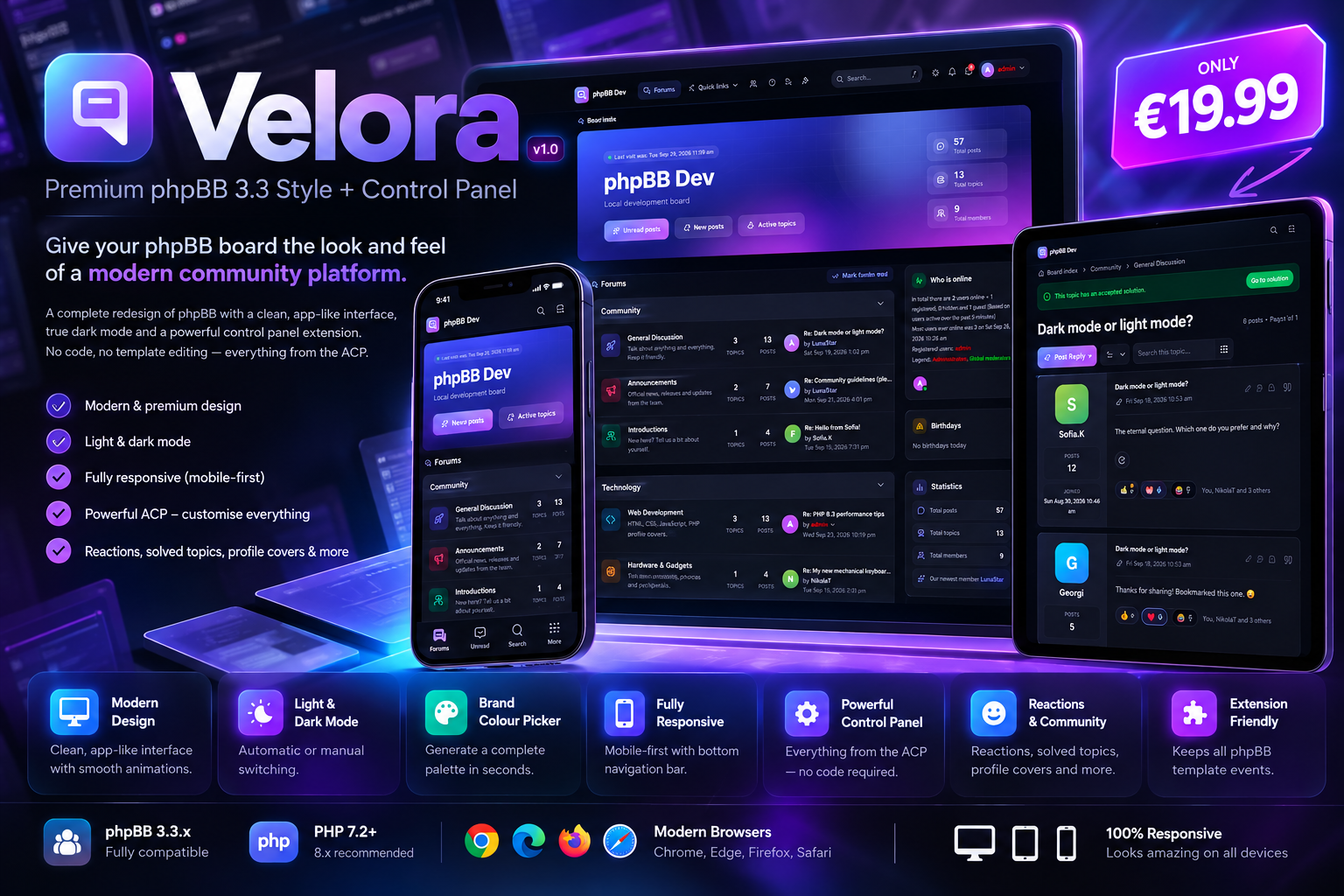
**Give your phpBB board the look and feel of a modern community platform.**
Velora is a complete redesign of phpBB with a clean, app-like interface, true dark mode, and a powerful control panel extension that lets you customise everything from the ACP — no code, no template editing.
One purchase, everything included: **the Velora style + the Velora Control Panel extension.**
---
## Why Velora?
- **Modern, premium design** — card-based layout, soft shadows, smooth animations and crisp vector icons throughout. It doesn't look like "just another phpBB theme".
- **Light & dark mode** — automatic (follows the visitor's system), or pick a default. Members can switch with one click.
- **Your brand in seconds** — choose a brand colour and the whole palette (buttons, links, highlights, gradients) is generated for you, in both light and dark mode.
- **Fully responsive** — designed mobile-first, with a bottom navigation bar on phones and a slide-out menu.
- **Everything from the ACP** — logo, colours, hero banner, announcement bar, footer, menu links, widgets and community features are all settings, not code.
- **Community features built in** — reactions, solved topics, profile covers, sidebar widgets and more, with no extra extensions needed.
---
## Features
### Design & layout
- Complete redesign of every page: index, forums, topics, posting editor, private messages, User Control Panel, member list, profiles, team page, search, FAQ, login and registration
- Light and dark mode with instant switching and no flash on page load
- Brand colour picker with 12 presets or any custom colour; the full palette is generated automatically
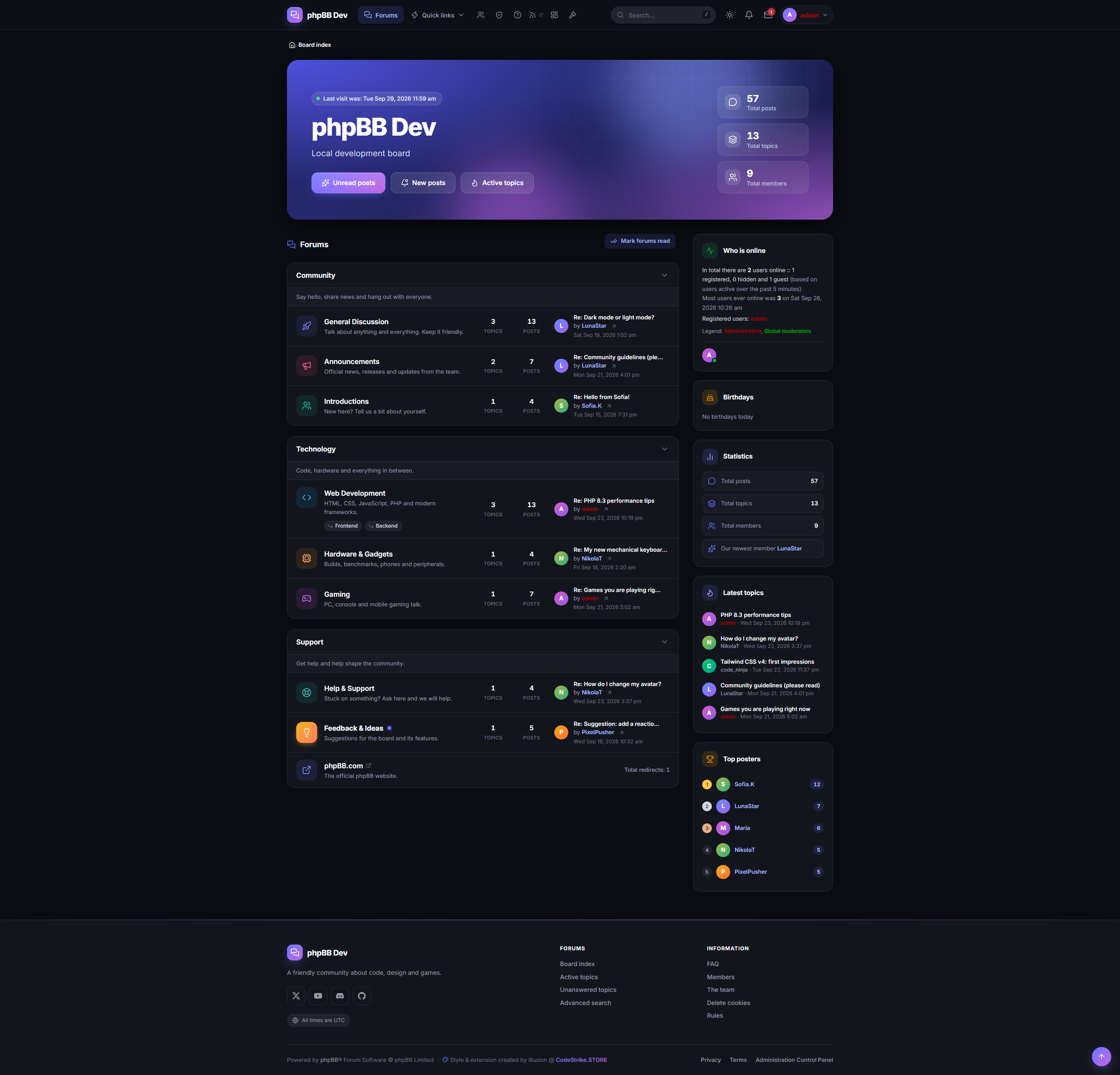
- Two forum layouts: **classic list** or **modern grid of cards**
- Custom icon and colour for every forum, chosen from 60+ icons
- Avatars in forum and topic lists, with neat letter avatars for members without one
- Optional full-width layout and sticky header
- Hero banner on the index with your own title, text and background image (can be shown to guests only)
- Announcement bar with 4 styles, which members can dismiss
- Rich footer with an about text, social links (Facebook, X, Instagram, YouTube, Discord, GitHub, TikTok, Telegram, Reddit, Twitch) and custom link columns
- Upload your logo, a separate logo for dark mode, and a favicon directly from the ACP
- Beautiful print layout for topics
### Navigation & usability
- Smart header that adapts to the available space, so nothing is ever cut off or hidden
- Mobile bottom navigation bar and slide-out menu
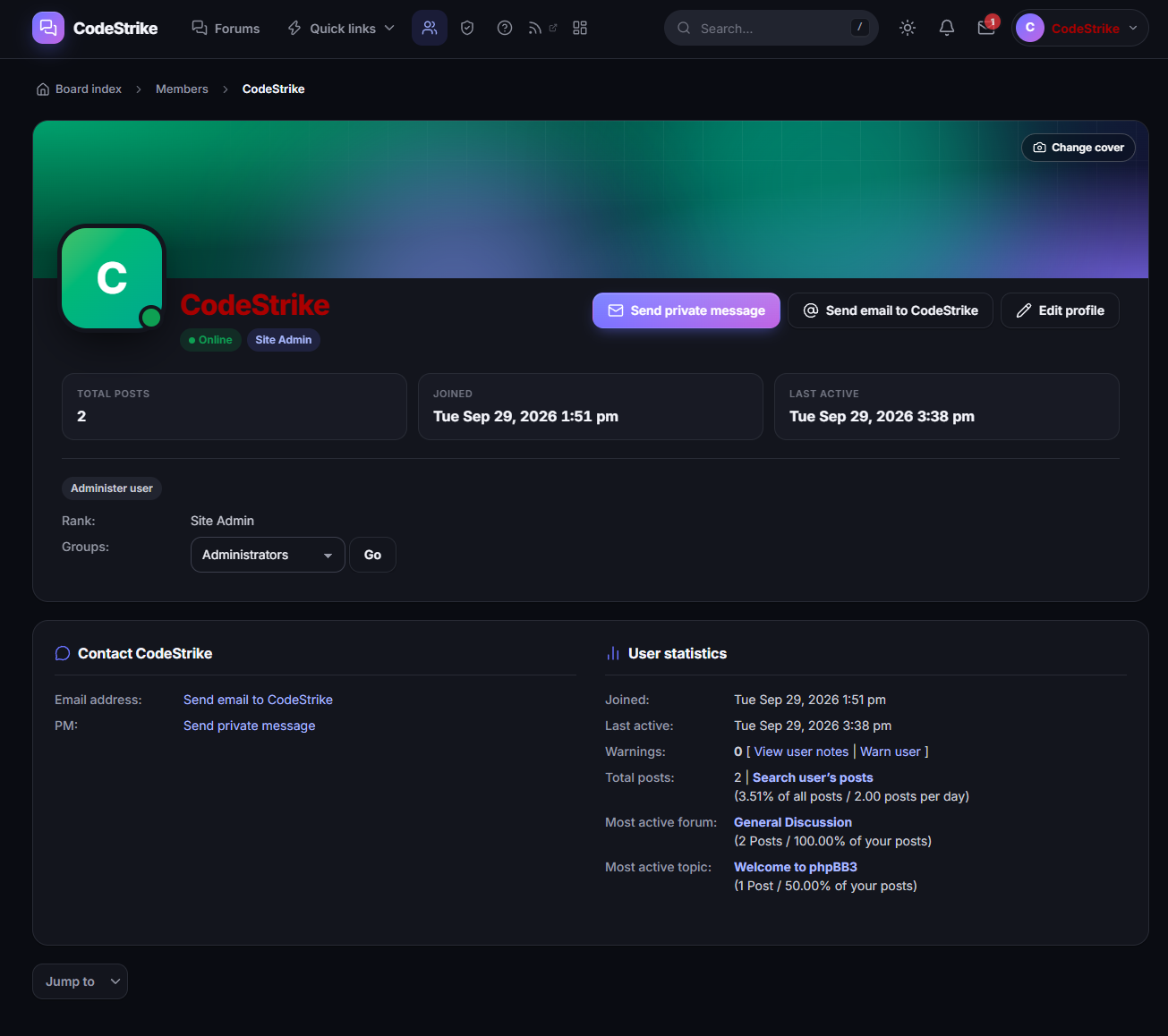
- Member hover cards: hover a username to see avatar, rank, posts and online status
- Keyboard shortcuts: `/` to search, `j`/`k` to move between posts, `r` to reply, `d` for dark mode, `?` for help
- Reading progress bar and a "jump to first unread" button in topics
- Collapsible categories (remembered per visitor)
- Instant search filter in the FAQ
### Community features
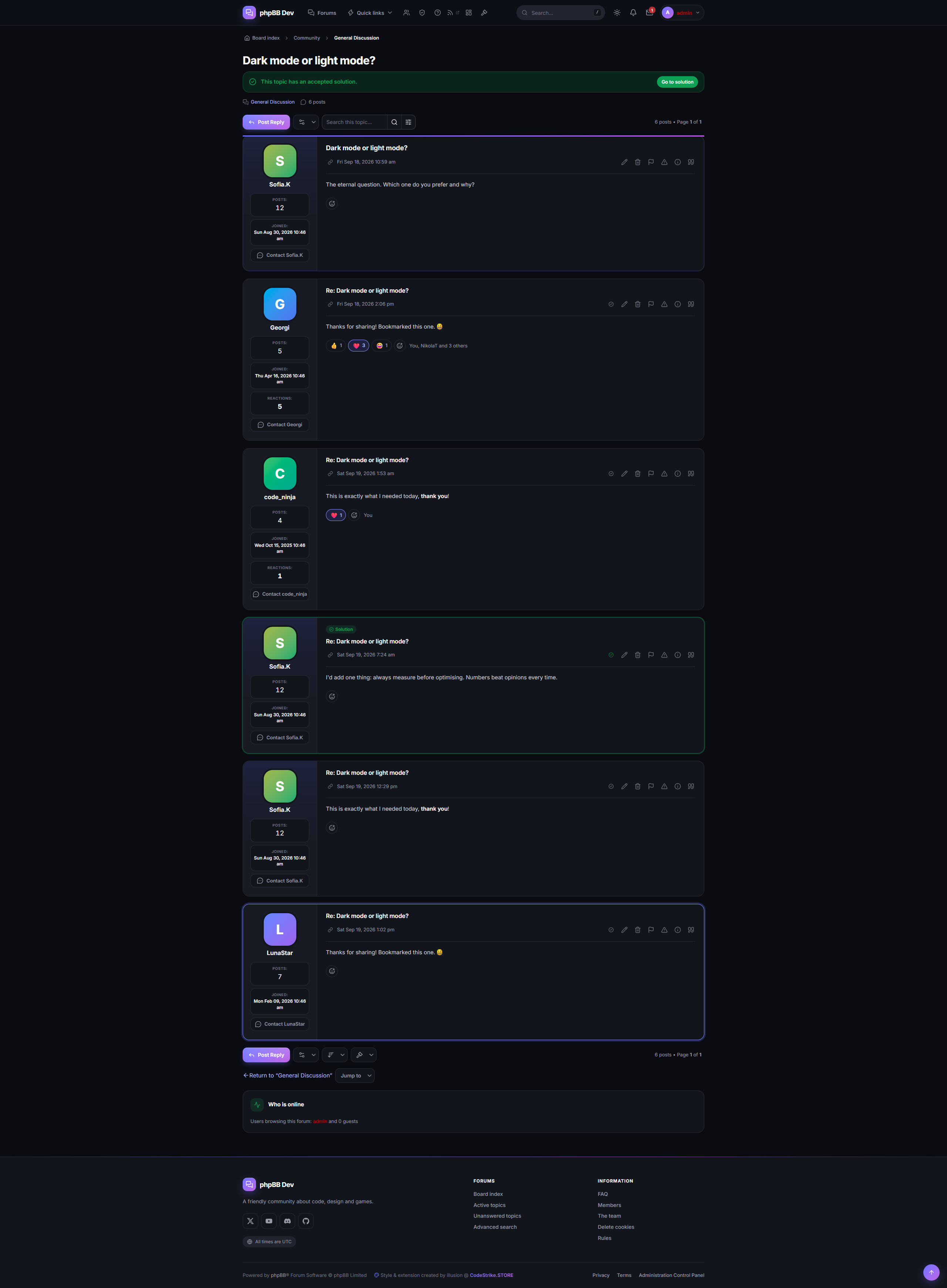
- **Post reactions** — 👍 ❤️ 😂 😮 😢 🙏 without page reloads, showing exactly who reacted ("You, Maria and 3 others")
- **Solved topics** — the topic author or a moderator marks the best reply as the solution. It is highlighted in the topic and gets a "Solved" badge in the topic list. Enable it per forum, which is ideal for support forums.
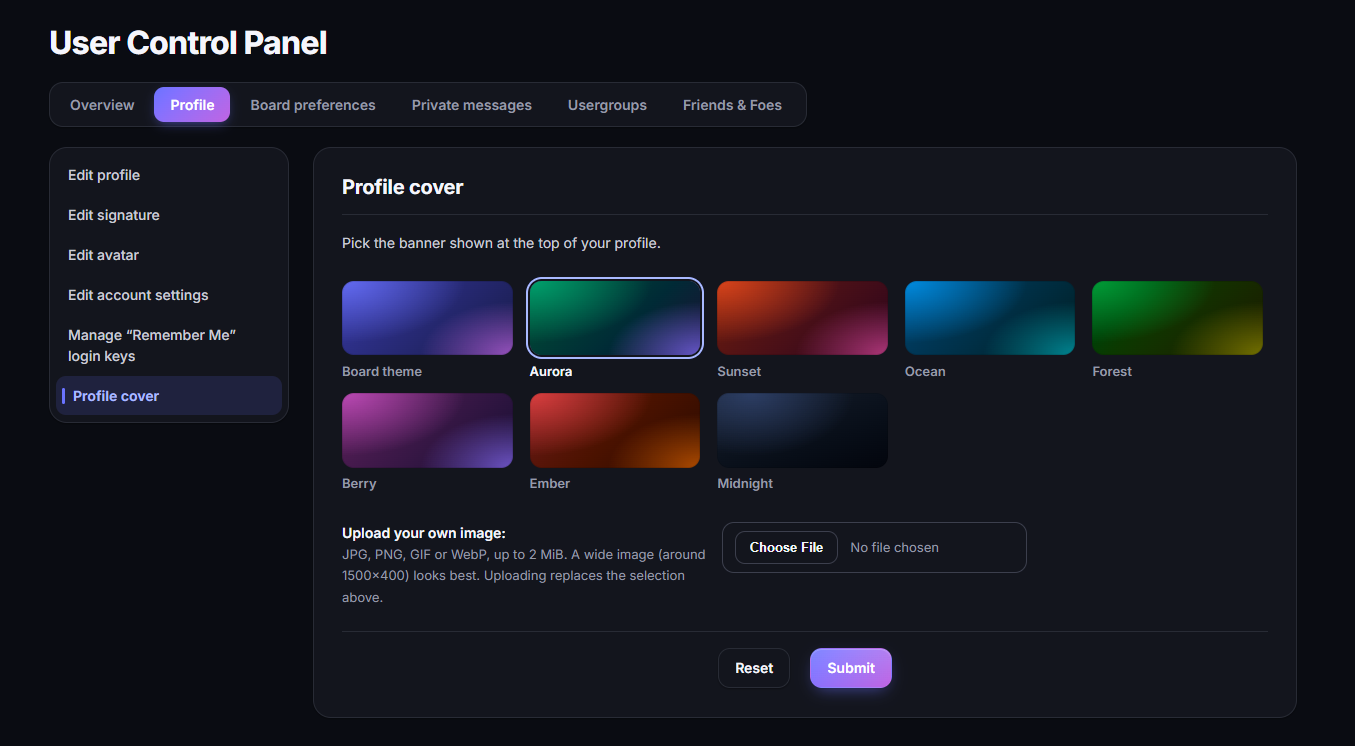
- **Profile covers** — members pick one of 7 gradient covers or upload their own image
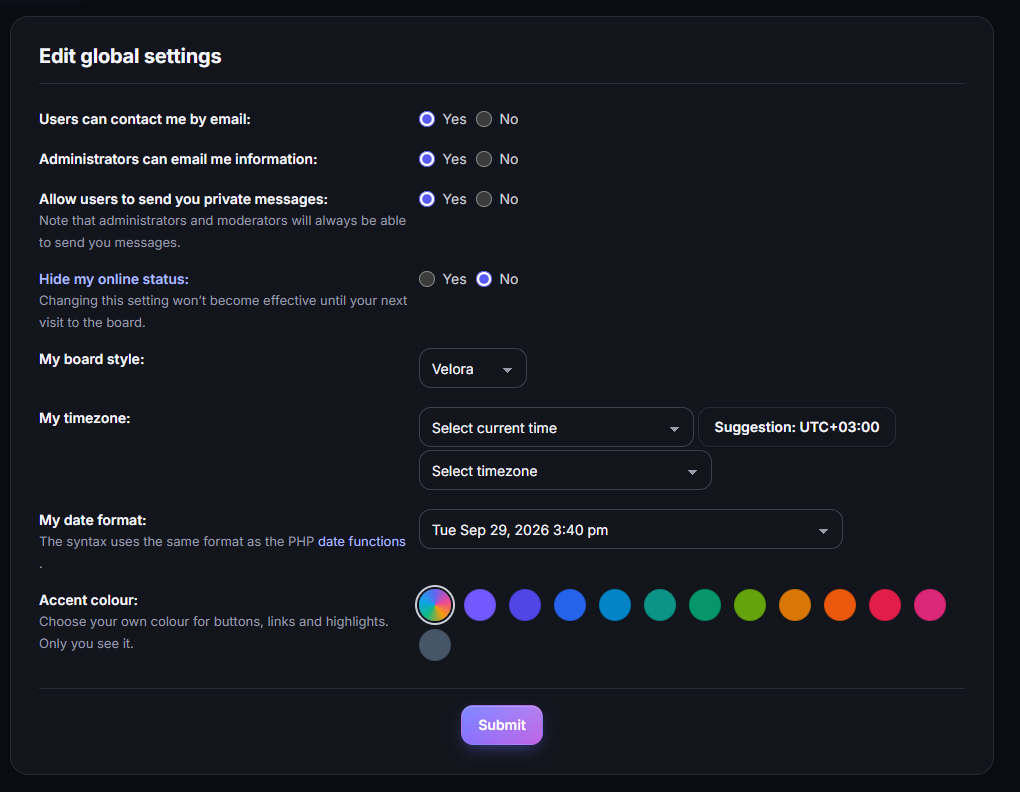
- **Personal accent colour** — each member can choose their own colour for the board
- **Topic thumbnails** — the first image of a topic is shown as a thumbnail in the topic list
- **Sidebar widgets** — latest topics, top posters and online member avatars on the index
### Admin control panel
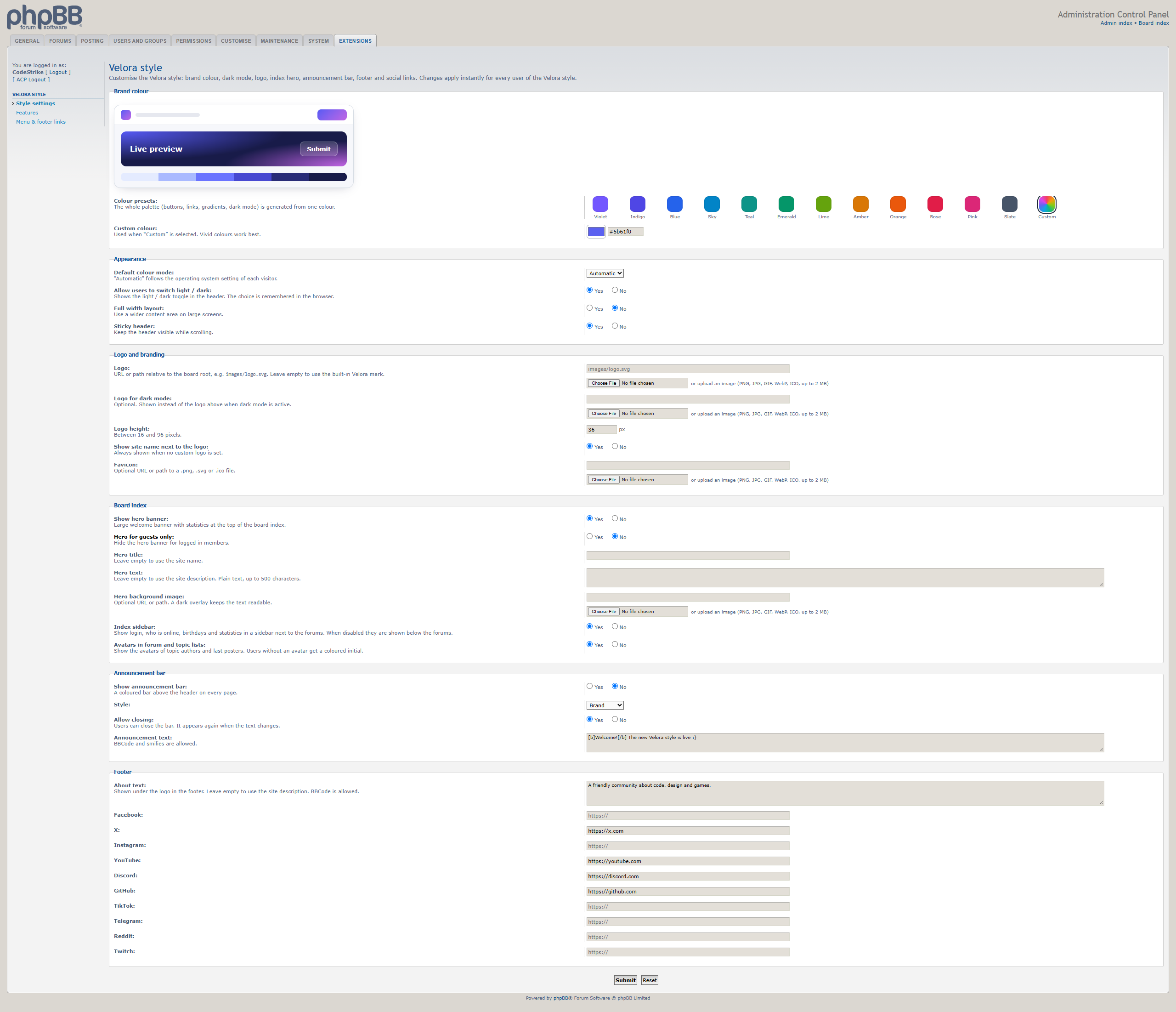
- Three clear ACP pages: **Style settings**, **Features** and **Menu & footer links**
- Live preview of the brand colour while you edit
- Menu & footer link manager: add links to the main menu or either footer column, with an icon, visibility (everyone / members / guests) and new-window option
- Every feature can be switched on or off individually
### Quality
- Keeps **all phpBB template events**, so extensions that hook into the templates keep working
- Right-to-left (RTL) language support
- Accessible markup: keyboard navigation, focus states, screen-reader labels and reduced-motion support
- Secure by design: permission checks, CSRF protection and validated uploads throughout
- Clean uninstall: disabling and deleting the extension's data removes everything it added
- Self-hosted Inter font and SVG icons, with no external requests to Google or CDNs
---
## Requirements
| | |
|---|---|
| phpBB | 3.3.x |
| PHP | 7.2 or newer (8.x recommended) |
| Browsers | Current versions of Chrome, Edge, Firefox and Safari (desktop and mobile) |
Velora uses modern CSS. Very old browsers (for example Internet Explorer, or Safari older than 16.4) are not supported.
---
## What's in the package
```
upload/
styles/velora/ the Velora style
ext/velora/veloracp/ the Velora Control Panel extension
developer-source/ CSS source files for developers (not needed for installation)
README.md this document
CHANGELOG.md version history
LICENSE.txt licence
```
---
## Installation
1. **Upload** the contents of the `upload` folder to the root of your phpBB board (the folder that contains `config.php`). This adds `styles/velora` and `ext/velora/veloracp`.
2. **Install the style:** ACP → *Customise* → *Style management* → *Install Styles* → click **Install** next to *Velora*.
3. **Make it the default (optional):** ACP → *General* → *Board settings* → set *Default style* to **Velora**. If you want every member to see it, set *Override user style* to **Yes**.
4. **Enable the extension:** ACP → *Customise* → *Manage extensions* → click **Enable** next to *Velora Control Panel*.
5. **Configure:** ACP → *Extensions* tab → **Velora style**.
> **Uploads:** logos, favicons and profile covers are stored in `images/velora/`. On most hosts this folder is created automatically. If uploads fail, create `images/velora` and `images/velora/covers` and make them writable (usually permission 755).
> **Tip:** after changing settings, if you don't see the change, purge the cache (ACP → *General* → *Purge the cache*) and refresh your browser.
---
## Updating to a new version
1. Disable the extension (ACP → *Customise* → *Manage extensions* → **Disable**). **Do not** click *Delete data*, or your settings will be lost.
2. Upload the new `upload` folder over the old files.
3. Enable the extension again.
4. Purge the cache.
## Uninstalling
1. ACP → *Customise* → *Manage extensions* → **Disable** Velora Control Panel, then click **Delete data** to remove all settings, reactions and database changes.
2. ACP → *Customise* → *Style management* → **Uninstall** Velora (switch the default style first).
3. Delete `styles/velora`, `ext/velora` and, if you no longer need the uploaded images, `images/velora`.
---
## Using the style without the extension
The style works on its own and looks the same out of the box. The extension adds the control panel and the community features (reactions, solved topics, covers, widgets, links, uploads and so on). For the full experience, install both.
---
## FAQ
**Will my existing extensions work with Velora?**
In most cases, yes. Velora keeps every template event from prosilver, the default phpBB style, so extensions that add content through events will appear in the right places. Extensions that ship their own templates only for prosilver may need small style adjustments.
**Can I use my own colours?**
Yes. Pick any colour in *Style settings* and Velora builds a matching palette for light and dark mode automatically.
**Is it translated?**
The interface uses phpBB's own language packs, so it works with any installed language. The extension's settings and features come in **English** and **Bulgarian**. Other languages fall back to English, and adding a translation only requires copying the `language/en` folder.
**Does it work on mobile?**
Yes. Velora is designed mobile-first, with a dedicated bottom navigation bar and touch-friendly controls.
**Can I modify the CSS?**
Yes. You can edit `styles/velora/theme/stylesheet.css` directly, or use the Tailwind sources in the `developer-source` folder to rebuild it.
**Can I remove the credit line in the footer?**
Please keep it. It helps support the continued development of Velora. If you need a white-label licence, contact us through CodeStrike.STORE.
---
## Support
Questions, bug reports and custom work: **[codestrike.store](https://codestrike.store)**
When reporting a problem, please include your phpBB version, PHP version, a list of installed extensions and, if possible, a link to your board.
---
## Licence & credits
Velora (style and extension) © 2026 illusion @ [CodeStrike.STORE](https://codestrike.store).
Released under the GNU General Public License v2 (GPL-2.0), like phpBB itself.
Includes:
- [Inter](https://rsms.me/inter/) font — SIL Open Font License 1.1
- [Lucide](https://lucide.dev) icons — ISC License
- [Simple Icons](https://simpleicons.org) brand icons — CC0 1.0 (brand names and logos are trademarks of their respective owners)
- Built with [Tailwind CSS](https://tailwindcss.com) — MIT License
phpBB® is a registered trademark of phpBB Limited. Velora is not affiliated with or endorsed by phpBB Limited.
**Give your phpBB board the look and feel of a modern community platform.**
Velora is a complete redesign of phpBB with a clean, app-like interface, true dark mode, and a powerful control panel extension that lets you customise everything from the ACP — no code, no template editing.
One purchase, everything included: **the Velora style + the Velora Control Panel extension.**
---
## Why Velora?
- **Modern, premium design** — card-based layout, soft shadows, smooth animations and crisp vector icons throughout. It doesn't look like "just another phpBB theme".
- **Light & dark mode** — automatic (follows the visitor's system), or pick a default. Members can switch with one click.
- **Your brand in seconds** — choose a brand colour and the whole palette (buttons, links, highlights, gradients) is generated for you, in both light and dark mode.
- **Fully responsive** — designed mobile-first, with a bottom navigation bar on phones and a slide-out menu.
- **Everything from the ACP** — logo, colours, hero banner, announcement bar, footer, menu links, widgets and community features are all settings, not code.
- **Community features built in** — reactions, solved topics, profile covers, sidebar widgets and more, with no extra extensions needed.
---
## Features
### Design & layout
- Complete redesign of every page: index, forums, topics, posting editor, private messages, User Control Panel, member list, profiles, team page, search, FAQ, login and registration
- Light and dark mode with instant switching and no flash on page load
- Brand colour picker with 12 presets or any custom colour; the full palette is generated automatically
- Two forum layouts: **classic list** or **modern grid of cards**
- Custom icon and colour for every forum, chosen from 60+ icons
- Avatars in forum and topic lists, with neat letter avatars for members without one
- Optional full-width layout and sticky header
- Hero banner on the index with your own title, text and background image (can be shown to guests only)
- Announcement bar with 4 styles, which members can dismiss
- Rich footer with an about text, social links (Facebook, X, Instagram, YouTube, Discord, GitHub, TikTok, Telegram, Reddit, Twitch) and custom link columns
- Upload your logo, a separate logo for dark mode, and a favicon directly from the ACP
- Beautiful print layout for topics
### Navigation & usability
- Smart header that adapts to the available space, so nothing is ever cut off or hidden
- Mobile bottom navigation bar and slide-out menu
- Member hover cards: hover a username to see avatar, rank, posts and online status
- Keyboard shortcuts: `/` to search, `j`/`k` to move between posts, `r` to reply, `d` for dark mode, `?` for help
- Reading progress bar and a "jump to first unread" button in topics
- Collapsible categories (remembered per visitor)
- Instant search filter in the FAQ
### Community features
- **Post reactions** — 👍 ❤️ 😂 😮 😢 🙏 without page reloads, showing exactly who reacted ("You, Maria and 3 others")
- **Solved topics** — the topic author or a moderator marks the best reply as the solution. It is highlighted in the topic and gets a "Solved" badge in the topic list. Enable it per forum, which is ideal for support forums.
- **Profile covers** — members pick one of 7 gradient covers or upload their own image
- **Personal accent colour** — each member can choose their own colour for the board
- **Topic thumbnails** — the first image of a topic is shown as a thumbnail in the topic list
- **Sidebar widgets** — latest topics, top posters and online member avatars on the index
### Admin control panel
- Three clear ACP pages: **Style settings**, **Features** and **Menu & footer links**
- Live preview of the brand colour while you edit
- Menu & footer link manager: add links to the main menu or either footer column, with an icon, visibility (everyone / members / guests) and new-window option
- Every feature can be switched on or off individually
### Quality
- Keeps **all phpBB template events**, so extensions that hook into the templates keep working
- Right-to-left (RTL) language support
- Accessible markup: keyboard navigation, focus states, screen-reader labels and reduced-motion support
- Secure by design: permission checks, CSRF protection and validated uploads throughout
- Clean uninstall: disabling and deleting the extension's data removes everything it added
- Self-hosted Inter font and SVG icons, with no external requests to Google or CDNs
---
## Requirements
| | |
|---|---|
| phpBB | 3.3.x |
| PHP | 7.2 or newer (8.x recommended) |
| Browsers | Current versions of Chrome, Edge, Firefox and Safari (desktop and mobile) |
Velora uses modern CSS. Very old browsers (for example Internet Explorer, or Safari older than 16.4) are not supported.
---
## What's in the package
```
upload/
styles/velora/ the Velora style
ext/velora/veloracp/ the Velora Control Panel extension
developer-source/ CSS source files for developers (not needed for installation)
README.md this document
CHANGELOG.md version history
LICENSE.txt licence
```
---
## Installation
1. **Upload** the contents of the `upload` folder to the root of your phpBB board (the folder that contains `config.php`). This adds `styles/velora` and `ext/velora/veloracp`.
2. **Install the style:** ACP → *Customise* → *Style management* → *Install Styles* → click **Install** next to *Velora*.
3. **Make it the default (optional):** ACP → *General* → *Board settings* → set *Default style* to **Velora**. If you want every member to see it, set *Override user style* to **Yes**.
4. **Enable the extension:** ACP → *Customise* → *Manage extensions* → click **Enable** next to *Velora Control Panel*.
5. **Configure:** ACP → *Extensions* tab → **Velora style**.
> **Uploads:** logos, favicons and profile covers are stored in `images/velora/`. On most hosts this folder is created automatically. If uploads fail, create `images/velora` and `images/velora/covers` and make them writable (usually permission 755).
> **Tip:** after changing settings, if you don't see the change, purge the cache (ACP → *General* → *Purge the cache*) and refresh your browser.
---
## Updating to a new version
1. Disable the extension (ACP → *Customise* → *Manage extensions* → **Disable**). **Do not** click *Delete data*, or your settings will be lost.
2. Upload the new `upload` folder over the old files.
3. Enable the extension again.
4. Purge the cache.
## Uninstalling
1. ACP → *Customise* → *Manage extensions* → **Disable** Velora Control Panel, then click **Delete data** to remove all settings, reactions and database changes.
2. ACP → *Customise* → *Style management* → **Uninstall** Velora (switch the default style first).
3. Delete `styles/velora`, `ext/velora` and, if you no longer need the uploaded images, `images/velora`.
---
## Using the style without the extension
The style works on its own and looks the same out of the box. The extension adds the control panel and the community features (reactions, solved topics, covers, widgets, links, uploads and so on). For the full experience, install both.
---
## FAQ
**Will my existing extensions work with Velora?**
In most cases, yes. Velora keeps every template event from prosilver, the default phpBB style, so extensions that add content through events will appear in the right places. Extensions that ship their own templates only for prosilver may need small style adjustments.
**Can I use my own colours?**
Yes. Pick any colour in *Style settings* and Velora builds a matching palette for light and dark mode automatically.
**Is it translated?**
The interface uses phpBB's own language packs, so it works with any installed language. The extension's settings and features come in **English** and **Bulgarian**. Other languages fall back to English, and adding a translation only requires copying the `language/en` folder.
**Does it work on mobile?**
Yes. Velora is designed mobile-first, with a dedicated bottom navigation bar and touch-friendly controls.
**Can I modify the CSS?**
Yes. You can edit `styles/velora/theme/stylesheet.css` directly, or use the Tailwind sources in the `developer-source` folder to rebuild it.
**Can I remove the credit line in the footer?**
Please keep it. It helps support the continued development of Velora. If you need a white-label licence, contact us through CodeStrike.STORE.
---
## Support
Questions, bug reports and custom work: **[codestrike.store](https://codestrike.store)**
When reporting a problem, please include your phpBB version, PHP version, a list of installed extensions and, if possible, a link to your board.
---
## Licence & credits
Velora (style and extension) © 2026 illusion @ [CodeStrike.STORE](https://codestrike.store).
Released under the GNU General Public License v2 (GPL-2.0), like phpBB itself.
Includes:
- [Inter](https://rsms.me/inter/) font — SIL Open Font License 1.1
- [Lucide](https://lucide.dev) icons — ISC License
- [Simple Icons](https://simpleicons.org) brand icons — CC0 1.0 (brand names and logos are trademarks of their respective owners)
- Built with [Tailwind CSS](https://tailwindcss.com) — MIT License
phpBB® is a registered trademark of phpBB Limited. Velora is not affiliated with or endorsed by phpBB Limited.
Need help with this product?
Join our Discord server and open a ticket — we usually reply within 30 minutes.
Reviews
—
0 review(s)
Login to write a review Login